Game Night Games on Your Phones: No TV Needed
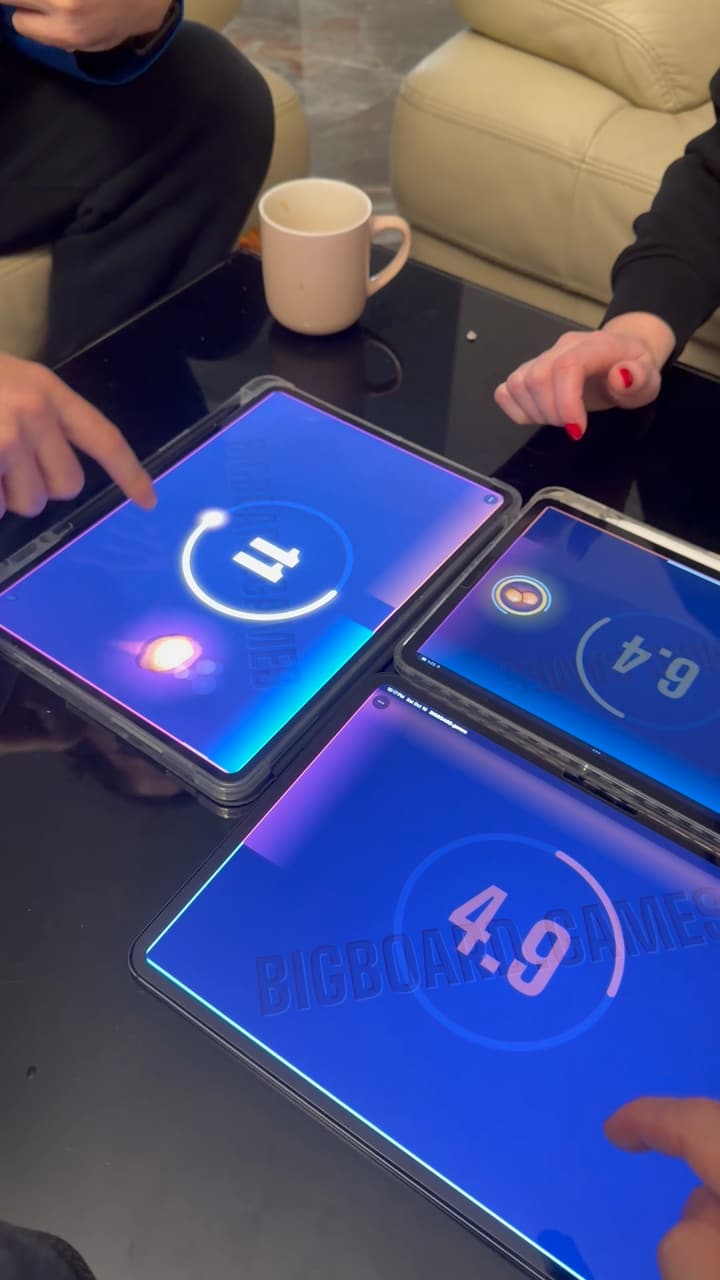
Game night games don't need a TV or a console. With BIGBOARD.GAMES, two to four phones or tablets laid flat and edge to edge become one board, and party games like air hockey, hot potato and tower defense run across all the screens at once. It's free in the browser, with no app to install, and it works wherever a table does: at home, in a café or on a train.
Most group games for phones put the game on one shared screen and turn every phone into a controller. That works well in a living room with a TV and a sofa. It works less well at a dinner table, in a café, on a train or around a camping stove, where there is no shared screen and nobody wants to carry one.
BIGBOARD.GAMES does it the other way around. The phones lying together are the board. The air hockey puck leaves your screen and slides onto your friend's. The hot potato crosses the gap between two phones. Everyone looks at the middle of the table, not at a wall.
This post is a guide to a game night on phones: what you need, where it works, how to start, and the best party games for your group.
What you need for a game night on phones
- Two to four devices. Phones, tablets or a mix. iPhone, iPad and Android all play at one table.
- A browser on each. Safari and Chrome both work. There is no app to install and no account to make.
- A flat surface. The devices lie screens up with their edges touching. How phones become one board explains why that works across different sizes.
- A connection. On the same Wi-Fi the devices find each other by themselves. On mobile data a secure relay connects them, and a match uses a little of your data allowance.
- A TV or laptop, if you have one. It's optional. Open the site in its browser and it can join the table as Just a screen: nobody plays on it, and it shows the board for everyone. It takes one of the table's four places.
These are games to play with friends in the same room, and you don't need a device per person. In most games two people can share one screen, and in several of them up to four can share a bigger one. Some games seat up to 12 players at one table, bots included. So six friends with three phones is a normal setup, not a problem, and the games for 3 or 4 players are a good place to start.
And if you only have one device, most games still play on it: two people share the screen, or one person plays a bot. The games for two on one phone are listed together.
You won't be the first table to try it. Since launch, people in 86 countries have played more than 7,500 games, over half of them on devices pushed together into one board.
Game night ideas: where to play
A game that needs no TV goes wherever a table goes. A few places where it fits well:
- The dinner table. Plates cleared, phones down in the middle. Kids and grown-ups play at one table, and the co-op games mean nobody loses alone.
- A café. A small table holds two phones end to end. That is enough for air hockey, chess or a round of Sea Battle while the coffee cools. Loser buys the next one.
- Travel. A train tray table fits two or three phones. A hostel common room fits four. Everyone already carries the hardware.
- Camping or a cabin. A cooler lid or a picnic table is enough. Away from Wi-Fi, mobile data works through the relay. Each device needs some connection to set the table up.
- Waiting. A gate at the airport, a long lunch, the hour before a film. Rounds are short, so you can stop at any time.
On a plane with no connection, one device still works. Open the app once while you're online and give it a minute to save its files in the background. After that it opens with no network and starts any game on that one device, shared or against the computer. Games across several devices need a connection to start.
How to start a game night in a minute
The full walkthrough is on how to play games on two phones together. In short:
- Open the site in the browser on each phone or tablet.
- Tap Start a table on one of them.
- Let the others join. On the same Wi-Fi they find the table by themselves. Elsewhere, scan its QR code or type its four-letter code.
- Lay the devices flat, edge to edge and screens up, and pick a game.
When a round ends, play it again at the same table or pick another game. Someone who arrives late opens the site, joins and plays the next round.
A friend who isn't in the room can join too, with the table's link or code. Their screen shows the whole board, turned to them, and they play from there.
The best game night games for your group
Every game below is free and runs in the browser, and they work as party games for adults as well as for a family table. The links go to each game's page, with its rules, its setups and a Play button.
Three or four people, loud and fast
These are the ones that get a table shouting.
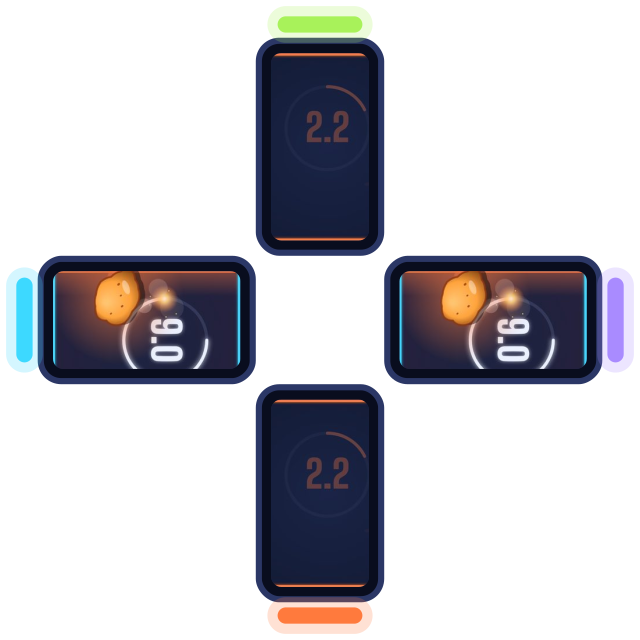
Hot Potato. One potato, everyone's fuse, like the classic circle game with the music swapped for a burning fuse. Flick it across the seams before your own fuse burns down. A fuse lasts 12, 20 or 30 seconds, and as the match heats up the fuses burn up to three times faster.
Opens a table in your browser. No app, no sign-up.
Mole Pop. Bop a mole and it pops up on someone else's screen at once. Slapping the whole screen counts as a miss, so mashing doesn't win. Where two devices meet there is one big hole they share.
Paddle Tennis. Slide your paddle along your edge and send the ball across every screen. Every hit makes it a little faster. Arcade drops power-ups mid-court; Classic is just the ball and the paddles.
Snake. One field across every screen, up to 12 snakes with bots, and a border that closes in.
A bigger group, in teams
With four devices and several people on each, team games keep everyone playing at once instead of waiting for a turn.
Air Hockey in teams. Four devices make two sides, or two devices with a few players on each play side against side, everyone defending a goal of their own. Without teams, three or more players play a free-for-all with five lives each. If you've only ever played air hockey at an arcade table, the phones make a surprisingly good rink.

Opens a table in your browser. No app, no sign-up.
Paddle Tennis in teams splits the same way, with a paddle and a goal line for every teammate. For a calmer table, Billiards plays two on two in 8-Ball and Snooker.
Everyone on one side
Some groups would rather not have a loser. In the co-op games the whole table plays against the game and wins or loses together.
Tower Defense. One road winds across all the devices. Each player builds towers on their own ground, and together you hold off the waves of bugs before they reach the lantern at the road's end, as in any good tower defense game. Pick 15 or 30 waves, or Endless, where the waves keep coming until the lantern breaks.
Tilt Run. One marble, one maze across the screens. Whoever has the marble on their screen tilts their device to steer it on, and it rolls under the bezel into the next person's part, like a wooden labyrinth passed round the table.
Mole Pop together works too: in its Cooperative mode one tap stuns the mole in the hole two devices share, and a tap from the other side right after whacks it for double.
Turn by turn, for a slower evening
Not every party is loud. These play at a talking pace, and the board games are all on one page.
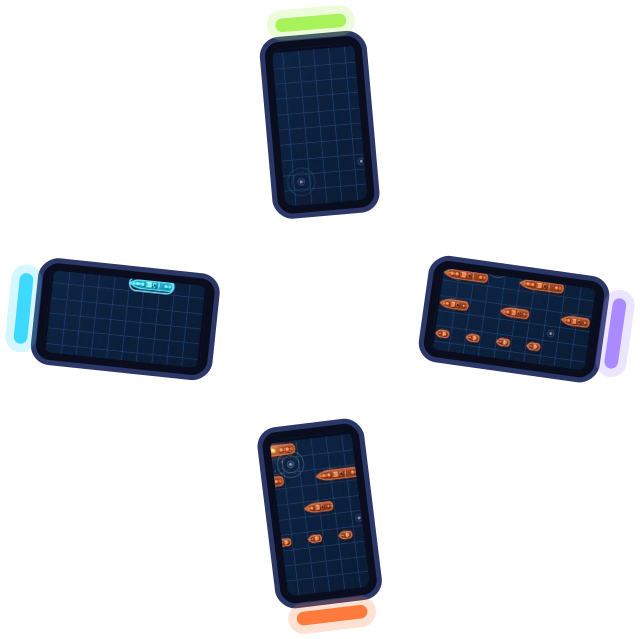
Sea Battle. Two to six fleets, one per player. With three or more, everyone can fire at once instead of waiting their turn, and special shots, mines and salvos are there to switch on. The devices don't need to touch: each one hides its own fleet.
Opens a table in your browser. No app, no sign-up.
Billiards. Your phones pushed together make one pool table. Five modes, from 8-Ball and 9-Ball to Snooker, Killer and Cutthroat, for two to eight players. Drag to aim, pull the cue to shoot.
Chess for three plays on a hexagonal board of 96 squares across three devices. Checkers plays two against two on four.
Short on people
If the group is small, bots fill the empty seats in every game except Spillover, at four levels from Easy to Impossible. Two friends and two bots make a match of air hockey for four.
Phones on a table or a shared screen?
If you have played Jackbox, the difference is where the game lives: there it is on a shared screen and the phones are controllers, and here the phones lying together are the board. The party games on phones are side by side on one page.
Both have their place. A shared screen is great when the group is on a sofa facing it, and a TV can already join a table here as a screen that shows the board. Phones on a table suit the places where there is no such screen, or when you'd rather sit around a table than face a wall. Here you watch the puck, the potato or the marble cross from one person's screen to the next, a few centimeters from everyone's hands.
Tips for a family game night on phones
- Lay the devices flat and close. Edges touching, screens up. The game knows each device's real screen size and its bezel, so the board lines up across devices of different sizes.
- Two iPhones top to top? An iPhone whose top touches another phone can pop up Apple Pay or AirDrop. Leave a finger's gap between them, or turn one phone sideways.
- Use the full screen. Add the site to your home screen and it opens with no browser bars, which gives you the biggest board.
- Not every game needs the devices to touch. In Sea Battle and Islands, the dots game for two, every device shows its own sheet or fleet, so they can lie anywhere.
- Mix sizes freely. A phone next to a tablet works. So does a phone joined from across the room, which makes these 2 player games on different phones work for a couple, too.
Start a table
Open BIGBOARD.GAMES on every phone at the table, tap Start a table on one, and lay them edge to edge. To pick a game, all the games are on one page. Hot Potato is a good first round: nobody needs the rules explained. New games arrive often, and What's new lists each one.