Free local multiplayer games for phones and tablets Push your devices together.
Lay phones or tablets edge to edge and their screens become one board: local multiplayer games, free in the browser, with no app.
The games
Games that cross the seam
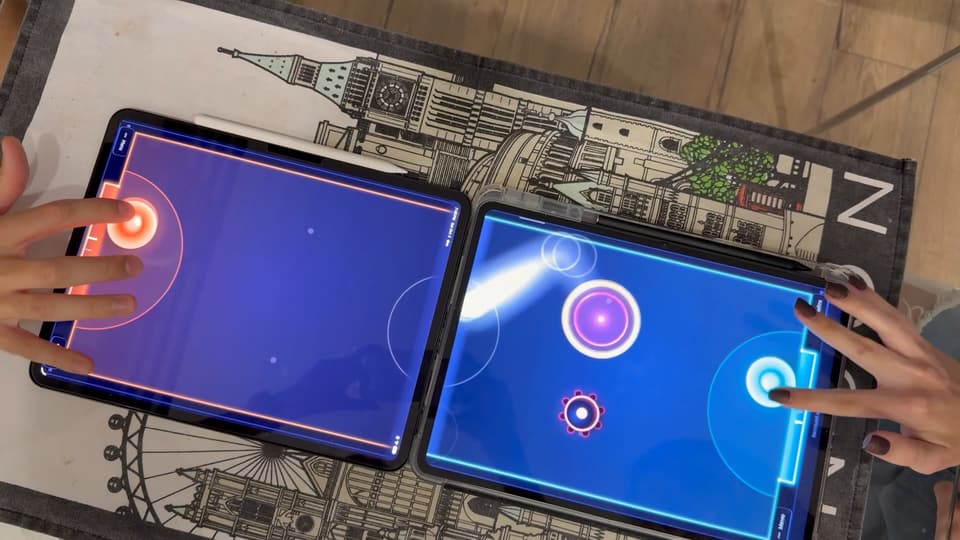
Air Hockey
Push the devices together. The puck crosses every seam.
Competitive2–12 players
Hot Potato
Flick the potato onto someone else's screen before your fuse burns out.
Competitive2–12 players
Paddle Tennis
Slide your paddle, angle the ball, guard your line across every screen.
Competitive2–12 players
Snake
Swipe to steer your snake across every screen. Eat, grow, box the others in. Last one alive wins.
Competitive1–12 players
Whack-a-Mole
Bop the moles before they hide: head to head, as a team, or against the clock.
CompetitiveCooperative1–12 players
Tilt Run
Tilt your device to roll one ball through a maze that runs across every screen, and sink it in the hole.
Cooperative1–12 players
Islands
Dots on grid paper. Ring theirs to capture an island.
Competitive2 players
Chess
Chess for 2 or 3. Checkmate a king, or take it, to knock its player out.
Competitive2–3 players
Checkers
Checkers for 2 to 4. Jump to capture, reach a far row to crown a king.
Competitive2–4 players
Sea Battle
Hide your fleet, then hunt theirs shot by shot. Up to six fleets.
Competitive2–6 players
Spillover
Draw shapes on the grid, drop them on their side. Don't fill up.
Competitive2 players
Tower Defense
Hold the path together as it crosses every screen.
Cooperative1–4 players
Coming soon
Compare every gameGot an idea for the next one? Suggest a game
Questions
How to play on two phones or tablets
Do we need to install an app?
No. Open bigboard.games in any browser: Safari, Chrome, even the one inside TikTok. If you'd like it to open like an app, install it from the browser, with no app store: it gets an icon on your home screen and opens full screen. On iPhone or iPad, open Safari's Share menu and tap Add to Home Screen; on Android, or in Chrome on a computer, use the browser's Install option.
Can iPhones and Androids play together?
Yes. Any mix of phones and tablets works, in a recent browser.
Do we need the same Wi-Fi?
It's easiest: on the same Wi-Fi the devices find each other and join by themselves. Otherwise scan the QR code or type the four-letter code.
Does it work on mobile data?
Yes. When devices can't reach each other directly, a secure relay connects them. Playing uses a little of your data allowance.
How many devices can join?
Up to 4 at one table. Most games play on 2 to 4; some also work on one device.
Is it free?
Yes, it's free to play in the browser.