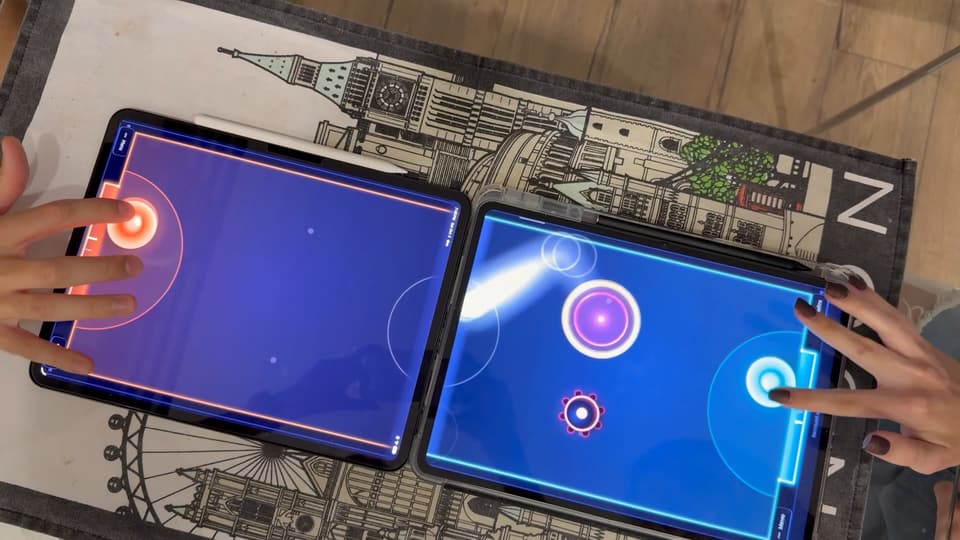
Start a table
- Open bigboard.games in the browser on each phone or tablet: Safari and Chrome both work.
- Tap Start a table on one of them.
- Let the others join: on the same Wi-Fi they find the table by themselves; elsewhere, scan its QR code or type its four-letter code.
- Lay the devices flat, edge to edge and screens up, and pick a game.
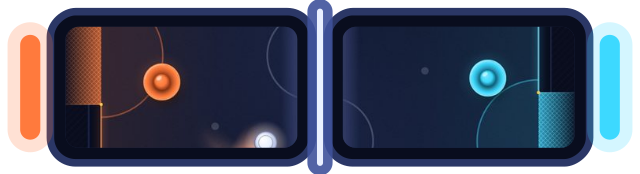
Why the phones touch
Each device shows its own part of one board. Where two screens meet, the game carries on across the seam: an air hockey puck, a potato, a marble or a chess piece leaves one screen and comes in on the next at the same place. That is why the devices lie flat, screens up and edges touching. A phone beside a tablet works too, and most 2 player games on different phones play this way.
Not every game needs the devices touching. In Islands, the dots game, every device shows the whole sheet and scrolls it on its own, and in Sea Battle and Secret Words every device keeps its own view, a fleet or a Guide's map, so they can lie anywhere. Go shows the whole board on every screen too, unless you pick One big board. In Air Hockey, Hot Potato, Paddle Tennis, Snake, Billiards, Tower Defense, Chess and Checkers, the game step's Board row has a second choice, One on each: every screen then shows the whole field, and the devices can lie apart too.
Wi-Fi, mobile data and a friend far away
The devices talk to each other directly. On the same Wi-Fi they find the table by themselves. On mobile data, or on a network that keeps devices apart, a secure relay connects them, and a match uses a little of your data allowance.
A friend who isn't in the room can play too: send them the table's link, or tell them its four-letter code. When the rest of you share one Wi-Fi, the table sees by itself that their device is elsewhere; if it doesn't, tap their device in the bar and pick Remote. A remote device is off the stitched board, and what it shows depends on the game.
In Air Hockey, Hot Potato, Paddle Tennis, Snake, Billiards and Tower Defense it shows the whole field, turned to its player, who takes a seat at the field's edge like everyone else and plays from there. In Chess, Checkers and Go every device then shows the whole board, each turned to its own player, and Islands and Sea Battle play exactly as they do in the room. Mole Pop makes the friend's whole screen a field of their own, Spillover shows each of you a live thumbnail of the other's well, and in Tilt Run they ride along and watch the marble, since only the screens on the table tilt it.
Any phone, no app
Any mix plays together: iPhone with Android, a phone with a tablet, two tablets. Everything runs in the browser, so there is nothing to install, no account to make and nothing to pay. You can add the site to your home screen if you like an icon; nobody has to.
One device, or more people than devices
Not everyone needs a device. Most games also play on one phone or tablet: two people share the screen, a turn or a zone each, and in 4 player snake or Mole Pop four can share one tablet. Bots can fill empty seats in every game except Spillover and Secret Words.
A TV or a laptop as just a screen
The devices on the table are the board, and a TV or a laptop with a browser can add a big screen to it: it joins as Just a screen. Tap + at the table, pick Just a screen, and open its link or type its screen code on that device. Nobody plays on it and it doesn't count as a player; it shows the board for the whole room. In Sea Battle it becomes the war map: every fleet's waters, whose shot it is and the clock, never the ships. Islands and Spillover are played on two devices, so they have no place for one.
Questions
Do the phones have to touch?
No, not always. Laid flat and edge to edge, the screens make one board that a puck or a snake crosses, and that's the way most games play best. But Islands and Sea Battle never need it, most other games can show the whole field on every screen (One on each), and a friend elsewhere plays remote, by link.
Do the phones need the same Wi-Fi?
No, but one Wi-Fi is smoothest. On mobile data or on different networks, a secure relay connects them.
Do iPhone and Android play together?
Yes, any mix of iPhone, iPad and Android phones and tablets plays at one table, in a recent browser.
Can a friend in another place join?
Yes, with the table's link or its four-letter code. In most games they see the whole board or field on their screen and play from there; in Tilt Run they ride along and watch the marble.
Do we need an app?
No, open bigboard.games in the browser on each device. It's free, and nobody signs up.