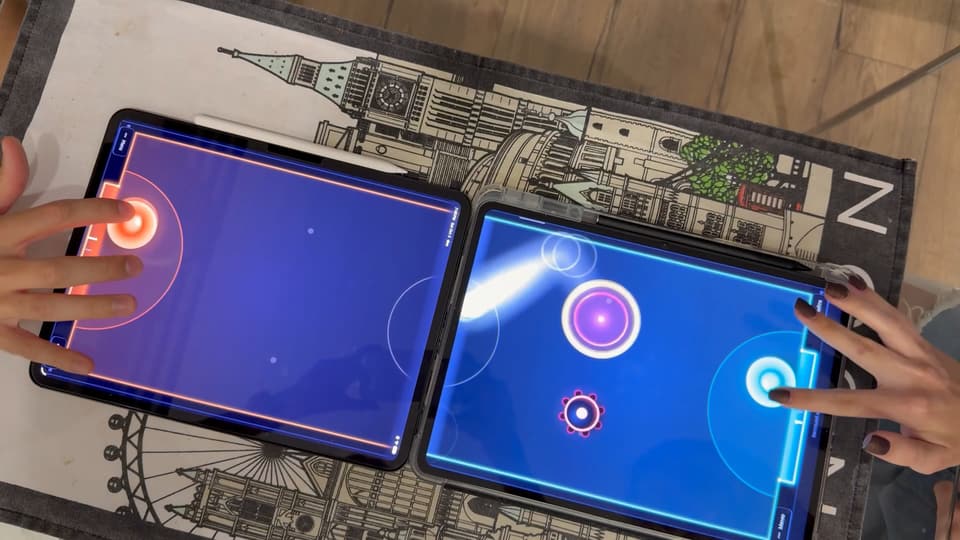
How to start
- Open bigboard.games on every device and tap Start a table on one of them.
- The others join by themselves on the same Wi-Fi; elsewhere, scan the QR code or type the four-letter code.
- Lay the devices edge to edge, screens up, as the drawing shows, and pick the game.
One rink from two screens
Put the two phones flat on the table, top edges touching, one facing each player. Your goal sits at the near end of your own screen, your mallet in front of it, and the centre of the rink is the seam. Held upright, the phones make a long, narrow rink; turn both sideways and it gets short and wide. One phone for both of you? 2 player air hockey on one screen puts a goal at each short end.
Two tablets play the same way, and so does a phone facing a tablet. Where the bigger screen's edge runs past the smaller one, that part is a rail: the puck crosses only through the opening where the two screens actually meet, and bounces off the rest.
A duel to 5, 7 or 11
Before the first serve, each of you grabs your mallet in the ring on your screen; then a 3-2-1 countdown drops the puck. Pick the winning score in the lobby: 5 for a quick game, 7 by default, 11 for a long one.
Comeback goals are on unless you switch them off. For every goal a side is behind, its goal mouth narrows by 7 % of its width, down to 65 % at five goals behind, so the player who is losing has less to defend and a big lead can still melt away. A third friend? 3 player air hockey gives everyone five lives instead.
Five arenas, and a friend far away
Classic is the plain air hockey table. Bumpers adds brass posts to bank shots off, Ice has barely any friction and lively rails, Heavy gives you a steel puck you have to wind up for, and in Mines a puck that touches a mine blasts off.
The phones talk to each other directly, smoothest on one Wi-Fi. A friend somewhere else can still play: they join with the table's link or code and take a seat at the edge of the rink. Their phone shows the whole rink, and they move their mallet from there. Or pick Same on every screen, and every device shows one rink.
2 players: questions and answers
Does a phone with a tablet work?
Yes, the puck crosses through an opening where the two screens meet, and the rest of that edge is a rail.
Must the two phones share Wi-Fi?
No, but one Wi-Fi is smoothest; elsewhere a secure relay connects them.
Can a friend play from another place?
Yes, they join with the table's link or code, see the whole rink on their phone and play their mallet from there.
Can we choose the winning score?
Yes, first to 5, 7 or 11 goals, picked before the match.