How Phones Become One Game Board in Your Browser
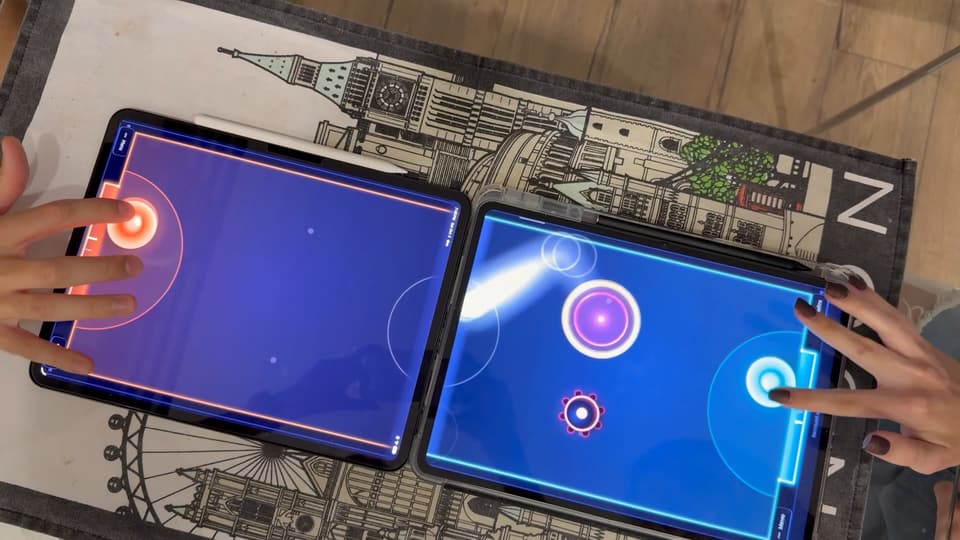
BIGBOARD.GAMES turns two to four phones or tablets, laid edge to edge on a table, into one game board. Each device knows the real size of its screen and where it lies, so an air hockey puck that leaves one screen slides onto the next. The devices play directly with each other over WebRTC, the server only introduces them, and it all runs free in the browser, with no app and no account.
I'm Nikita, and I build BIGBOARD.GAMES. The question I hear most comes right after someone sees the puck cross the gap for the first time: "wait, how does it do that?" This post is my answer, without the jargon. I write about building it, and about Cloudflare, on my personal blog.
What happens when you push phones together
Put two phones side by side and you have two small screens with a strip of plastic between them. BIGBOARD.GAMES treats them as windows onto one bigger table. Each device draws only its own part of the board, and together they show all of it.
That's why the devices lie flat, screens up and edges touching. In Tilt Run one marble rolls through a maze that spans every screen. In Hot Potato the potato gets flicked from one person's screen to the next. In Billiards the phones pushed together make one pool table. Any mix of devices works: an iPhone next to an Android phone, a phone next to a tablet.
How each phone knows its size and its place
No two phones match. One has a bigger screen, another a thicker frame, a third lives in a chunky case. If the game simply glued the screens together dot by dot, the puck would jump, shrink or come out off its line at every gap.
So every device tells the game how big its screen really is, in millimeters, and how wide the frame around it is. Many phones and tablets are recognized on their own, and for the rest the game makes a good guess. When the guess is off, there's a ruler everyone carries: bank cards all come in one standard size, so you hold one to the screen and drag until the outline on the screen matches it.
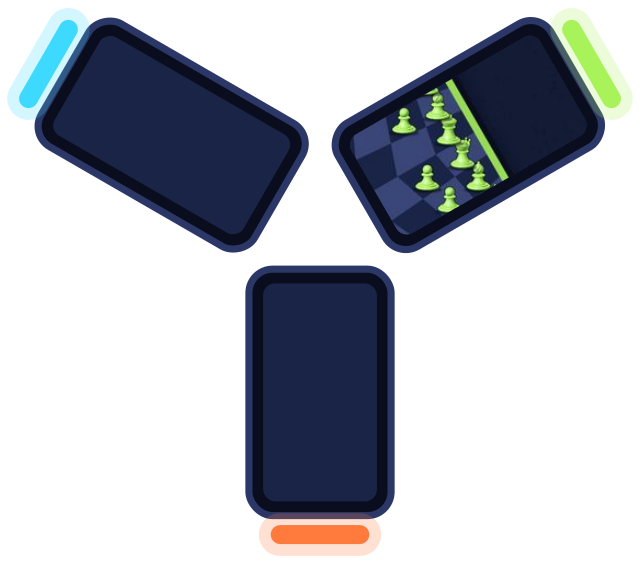
Then the table needs to know where each device lies. When you pick a game, BIGBOARD.GAMES suggests a layout that suits it: two phones facing each other, a row, a block of four, or a triangle for three-player chess. It shows the layout as a small map of your table, and if a device on the map isn't where it really is, you drag it there.
Opens a table in your browser. No app, no sign-up.
How the game crosses the gap between screens
The board is measured in real millimeters of your actual table, the gaps included. The frames between two screens are part of the world too. The puck keeps moving underneath them, out of sight, and comes out on the next screen where and when it would on a real table.
The whole table also plays at one size. A puck that travels from a small phone onto a big tablet stays the same size, so it doesn't suddenly grow as it changes screens. And in Billiards for two the table is laid out so that no strip of the cloth is lost under a frame.
How phones in one room find each other
Start a table on one device, and the others can join it in a few ways. When they share a Wi-Fi network, they usually find the table by themselves: open the site, and it's there. Anywhere else, point the camera at the table's QR code, or type its four-letter code. A link sent in a chat works too.
That link is also how a friend in another city joins. Their screen shows the whole board, turned to them, and they play from where they are, which makes these 2 player games on different phones work across a distance as well. How to play games on two phones together walks through every step.
Why the phones talk to each other directly
Once everyone has joined, the devices connect straight to each other. It's a peer-to-peer link, made with the same browser technology that carries video calls. A puck's position goes from my phone to yours across the table, not to a server on another continent and back. That's what keeps a fast game like air hockey feeling instant.
The server's part is smaller than people expect. It's like a host who introduces two guests at a party and leaves them to talk: it keeps track of who sits at the table, helps the devices meet, and writes down the result at the end. While you play, it isn't involved.
Sometimes there's no direct path. On mobile data, phones often can't reach each other straight away, so a secure relay passes the messages between them. The game plays the same, and a match uses a little of your data allowance.
Nothing to install, no account to make
Everything runs in the browser that's already on the phone, Safari or Chrome. There's no app to download, and nobody signs up to play. At a real table that matters more than it sounds: the friend who just sat down is playing a few seconds after opening the site, not after a download and a new password.
If you like an icon, add the site to your home screen. It's a progressive web app, so it then opens full screen with no browser bars, which gives you the biggest board, and it starts the games for one phone even with no connection.
Built on Cloudflare
I love Cloudflare. I wrote a whole post on why I build on Cloudflare, so it was an easy choice for BIGBOARD.GAMES. The pages come from a server near wherever you are, and the little work the server does for a table happens close to it too. It also grows without fuss: BIGBOARD.GAMES already handles hundreds of games every day, and more than a thousand on its busiest days, without a glitch. That comes to close to 7,000 games in the last two weeks.
Try it on two phones
Open BIGBOARD.GAMES on two phones and tap Start a table on one. Lay them flat, edge to edge, and watch what the puck does at the gap. With only one phone, play against a bot or share the screen with a friend. All the games are side by side on one page, and for a whole group there are game night ideas for your phones. What arrived this month is in the November update.
I still grin every time a puck disappears under two strips of plastic and comes out on the right line. If you have a question about how something works, or an idea for a game, how to reach me is on the About page.